Modules

Animal Management

Manage your entire herd in one place. Beyond simple tracking, FarmManager provides deep insights into lifecycle events, genetics, and nutrition performance.

43capabilities
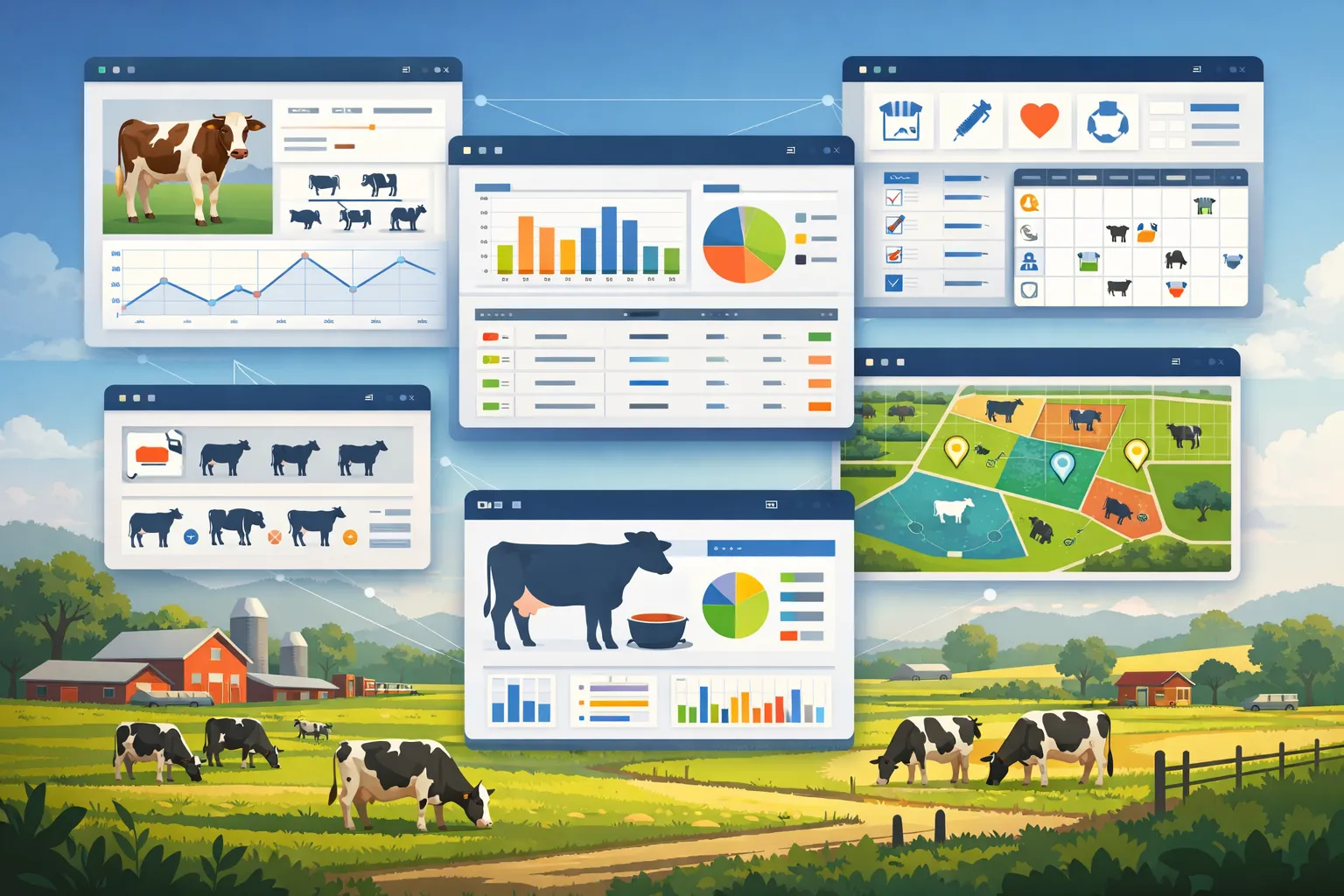
Farmyard backdrop with grazing dairy cows and app windows: an animal profile card with breed icons and a growth chart, bar and pie charts, a table with status checkmarks, a cow at a feed trough, and a pasture map with coloured plots.
capabilities

Animal Management: 43 capabilities

01

Livestock

Always have an accurate overview of your animals. Record breeds, weights, health status, and receive automatic age calculation based on birthdate. You can import existing herd lists as a CSV or Excel file (species, name, ear tag, breed, date of birth, sex, status); a repeated import updates the animals via the ear tag. Animals that the import newly creates are not reported to HI-Tier.
02

Weighings & Daily Gain

Every weighing is stored with date, weight and source in the animal's weighing history – recorded individually on the animal or after scanning the ear tag, and for a selection of animals also in one step (then with the same weight). The animal list shows the daily gain on request, green for gain and red for loss, and on the “Statistics” tab of the animal list you find the growth curve per species (monthly average) and a ranking of the animals with the best and the weakest daily gain.

03

HI-Tier

Integration for the German animal origin verification and information system. The system is used to report and manage livestock populations and events such as births or movements of farm animals. The integration enables access to relevant farm and animal reporting data in order to digitally map reporting requirements and automate processes in livestock management. With a connection set up, the event list for cattle shows the deadline for each report (event date plus 7 days) with its status, a filter shows reports that are due soon and overdue, and what you have reported directly in the HI-Tier portal you mark as reported. If you delete an event that FarmManager reported, FarmManager sends the cancellation to HI-Tier when automatic HI-Tier synchronisation is on.

04

Import your stock from HI-Tier

With an HI-Tier connection in place, you pull the stock held there straight into FarmManager – cattle with their life events (such as birth, arrival and departure, death) and, if the mother is recorded in FarmManager, with the link to her; for pigs and for sheep and goats the movement and reference-date data. By default only the changes since the last retrieval are fetched; “Full stock check” (cattle) or “Full movement sync” (pigs, sheep, goats) retrieves everything anew. Records that already exist in FarmManager are updated by the retrieval with the HI-Tier data. So you start from the data HI-Tier already holds instead of typing it in.

05

TAMG Compliance (Antibiotics)

Administrators switch on the TAM module for the reports under the Veterinary Medicinal Products Act themselves in the farm's HI-Tier dialog, as soon as the HI-Tier connection is in place. For each declared use category, FarmManager creates in the reporting window the draft of the report under § 55 TAMG with animal count and use category (half-yearly until 2026, annually from the recording year 2027); you check it and submit it to HI-Tier, and with automatic HI-Tier synchronisation a draft marked as ready goes out by itself before the deadline if you wish. In addition there are the zero report with one click, the livestock-holding declaration per use category (Annex 3) and deadline reminders. For an antibiotic treatment you choose the active substance from the BVL substance catalog with reserve antibiotics flagged, and from Pro you report treatments of cattle, pigs, chickens and turkeys individually under § 56 – in the name of the treating vet, with their HI-Tier access. FarmManager derives the therapy frequency under § 58 TAMG from this only locally.

06

Genetic Lineage

Map full pedigrees by linking mothers and fathers. Track bloodlines across generations to optimize breeding. On the pedigree, FarmManager shows Wright's inbreeding coefficient F for the selected animal, in the breeding form (Pro) for the planned mating. From 6.25% the value is marked as caution, from 12.5% as high risk – as a hint, not a block.

07

Nutrition Monitoring

Log feeding events and monitor consumption patterns. You record a feeding for several animals or a whole herd in one step – the quantity is split or credited in full to each animal – and combine several feeds in the process. Optionally, FarmManager books the feed out of storage at the same time (from Pro).

08

Event Logging

Whether an animal has a feeding issue, a vaccination is missed, or other events occur – record and track all events at any time.

09

Pasture Assignment

Plan and track animal movements across land plots and paddocks. The grazing calendar shows fields with their paddocks as a timeline together with the herds' grazing plans and points out overlaps, rest periods that are too short and overstocking (LU per hectare); rest period and maximum stocking can be adjusted per paddock. The notices are warnings, and the plan is saved anyway.

10

Herd Management

Group animals by age, breed, or purpose. Keep a clear overview of your herd at all times. Move a single animal, or several at once as a bulk action, into another herd – the current herd is excluded from the choices, and the move is recorded in the herd history. You can also start the assignment directly from a herd's row menu, and create an animal that is still missing from the stock in the same dialog.

11

Ration Calculation

Calculate the ration for dairy cows, for one animal or a herd, on three levels – basic feed, balancing feed and performance feed. FarmManager works out energy (NEL), crude protein, usable crude protein (nXP), ruminal nitrogen balance, crude fiber and aNDFom as well as calcium, phosphorus, magnesium and sodium, and shows milk potential and deficit against the target milk quantity. The quantity of the first performance-feed item results from the largest deficit in crude protein, usable crude protein and energy. Cost optimization of the mix is not part of it.

12

Breeding & Reproduction

Document mating and artificial insemination, confirm pregnancies, and track expected and actual birth dates, offspring counts, and outcomes. Upcoming births are surfaced automatically in your calendar.

13

Stock Register (Bestandsregister)

Generate the statutory per-species stock register as a print-ready A4 PDF for cattle, sheep and goats. It lists opening and closing stock alongside every classified arrival and departure (birth, purchase, sale, slaughter, death) for the chosen period, each with the counterparty holding number. The register is built automatically from your existing animal and lifecycle data, so it is ready to print and hand to the authority on request.

14

3D Pedigree View

Explore bloodlines in an interactive 3D view that shows the multi-generation ancestor pedigree together with the animal's direct descendants. Click any node to open a detail card with breed, sex and date of birth, or jump straight to that animal in a new tab. A fullscreen mode and a 3 to 8 generation depth control let you inspect deep lineages, and animals that recur in the tree are flagged as an inbreeding hint.

15

Annual Grazing Metrics

The herd-on-land plans yield the grazing days of the current year as well as the number of grazing periods currently in progress. Additionally reported are the number of fields grazed this year and the herds that were out on pasture. The grazing diary – per grazing period herd, field, period, grazing days and status – you export as CSV.

16

Herd Reproduction Metrics

The recorded services yield calving interval, days open, insemination index and pregnancy rate - every metric from real events, never estimated. When the data is too thin, the metric shows a dash instead of a misleading zero.

17

3D Mating Network

Pick an animal and see its mating-capable partners as a 3D network, coloured by the inbreeding coefficient of the offspring (safe, caution, high risk); shorter and thicker edges indicate closer relation and help you deliberately avoid inbreeding.

18

Sow File with Ear Tag and Status

Every sow is kept with sow no. or ear tag, name, breed, date of birth and housing-in date and carries the status Active, Culled or Sold.

19

Reproduction Cycles from Service to Weaning

Every cycle runs through the stages Served, Pregnant, Farrowed and Weaned, or is marked as Returned on a failed service. From the service date the sow planner pre-fills the projected farrowing date with 115 days of gestation and lets you adjust it freely if needed. For each farrowing, record liveborn, stillborn and mummified piglets as well as the weaning date and the number of piglets weaned per reproduction cycle.

20

Sow Planner Performance Metrics

The sow planner derives liveborn and weaned piglets per litter as well as rearing losses as the share of liveborn piglets that die before weaning. From each sow's chained cycles the system calculates the average span from weaning to the next service, and the litters-per-sow-per-year metric is projected from the farrowing interval and makes herd productivity comparable. Five performance metrics appear as tiles above the sow list and respect the active filters; with too little data a tile simply shows a dash.

21

Filter, Search and Export

Sows can be filtered by status, breed, date of birth and arrival date, searched by ear tag and exported with their master data as CSV or Excel.

22

Flocks per Poultry Type with Housing-in and Stock

Keep flocks for layers, broilers, pullets, turkeys, ducks and geese and store the breed or hybrid per flock, such as Lohmann Brown or Ross 308. Record the housing-in date, the number of birds housed and the barn; the current stock is derived automatically from the birds housed minus all recorded departures and losses

23

Daily Flock Records

Document eggs laid, departures and losses, feed in kilograms, water in litres and the average weight in grams per date

24

Salmonella Monitoring

Store the date of the last salmonella test and the result with the states negative, positive and pending for statutory record-keeping

25

Poultry Flock Performance Metrics

FarmManager computes laying performance, loss rate and viability as well as total eggs, total feed and total water automatically from the daily records. For broilers, feed conversion as FCR (feed per kg of live weight) and the European production efficiency factor EPEF are added; the water-to-feed ratio sits beside them as a separate metric for every flock

26

Tiles and Analytics Charts

Metric tiles show total flocks, active flocks, current stock and the average loss rate; charts distribute flocks and stock by status and poultry type

27

Filter, Search and Flock Export

Filter flocks by poultry type, status, breed and salmonella result, search by the flock name and export the flock list via file export

28

Fertility · Action Lists

From breeding and calving data, FarmManager derives each dam's reproductive status (fresh, open, bred, pregnant, dry) and offers due tasks as action lists – breeding or heat, pregnancy check, dry-off and upcoming calving, each with a due date. In the calving list you record the birth right in the row; if a heat cycle has passed since a service and the pregnancy is not confirmed, the animal appears in the breeding list again. The gestation length depends on the species; voluntary waiting period, heat cycle and check window follow fixed default values from cattle farming, and dry-off is planned for cattle only.

29

Fertility · Planning

Alongside the action lists sits the forward-looking half of fertility. From the breeding and calving data you have recorded, FarmManager projects each dam's cycle forward: a herd forecast shows, for the next 26 calendar weeks, how many animals will be dry, pregnant, bred, open or fresh; the herd timeline lays out each animal as its own row over 3, 6 or 12 months and can be filtered to one herd; two plain-text lists by date show the dry-offs and the calvings of the next 8 weeks. Every bar and every date carries a provenance label – "Recorded" means it stands in the data as entered, "Expected" rests on a confirmed pregnancy, "Assumed" is carried forward from standard intervals. Nothing is stored: every row is computed from the existing data each time the page is opened.

30

Breeding wheel

The breeding wheel plots one dam's year as a circle: end of the waiting period, expected heats, service, dry-off and calving sit at their real dates, the pregnancy check as an arc over its window rather than a point, and a needle marks today. The same dates appear beside it as a list. With no animal selected, the wheel works as a calculator instead: enter a reference date, choose whether it is a service or a calving, and the species – the remaining dates follow from that. That way it replaces the cardboard breeding wheel even for an animal that is not in the system at all.

31

Paddocks within a field

Subdivide a field into individual paddocks directly on the map. Drawing is constrained to the parent parcel's area and automatically prevents neighbouring paddocks from overlapping. All paddocks appear together on an overview map, and you can start a grazing plan straight from a paddock.

32

Forage budget & sward

A seasonal growth model combined with the current weather estimates grass growth per paddock. The grass wedge and feed balance show the herd's supply and demand including days ahead; cover readings can be flagged per paddock as measured or estimated.

33

Public animal passport

Deliberately publish an animal's passport. A notice warns before publication, and the QR code points to the public or the internal view depending on visibility. You also generate the animal passport as a PDF – for one animal, a selection or the filtered list, each animal on a new page with master data, lineage (dam and sire) including inbreeding coefficient, weighings, herd movements and QR code; vaccinations, treatments, breeding data and barn movements appear as far as your plan includes the modules.

34

Record births & calvings

Register a birth with offspring, stillbirths, herd move and status in a single step – with the full animal form rather than a stripped-down subset, breed and birth weight included. You scan each calf's ear tag right there, and every offspring row carries its own name. The expected birth date is pre-filled from the gestation period, and pregnancy can be confirmed as a row action or dismissed as a negative result. An offspring tab on the dam jumps to the matching birth record.

35

Quick-define breeding & link offspring

Open a breeding cycle with a single action — from the header, as a follow-up cycle from a breeding row, or straight from the animal table. Offspring appear as a table and their own tab, the origin cycle is linked on the animal, and the birth event is recorded on the dam's side.

36

Scan an ear tag — camera, NFC or Bluetooth

Scan an ear tag's barcode, QR, or DataMatrix code directly with the device camera – the animal is found instantly, or the ear-tag number is filled into the form automatically. Camera scanning also works on iPhone (Safari/iOS) and in Firefox, no extra app required. Read standard 134.2 kHz electronic ear tags with a Bluetooth reader stick, and NFC ear tags by holding an Android phone with NFC against them. A selection dialog offers the matching scan method depending on the device — camera, photo number, NFC, or Bluetooth.

37

Recognise the number from a photo (OCR)

For ear tags with only a printed number and no barcode, the app reads the digits using on-device text recognition. Recognition runs entirely on the device or in the browser – no cloud service, no image ever leaves the device. The recognised number is shown for confirmation before the lookup.

38

Find or create an animal by scan

After scanning, an action menu opens for the matched animal – view it, log weight and, depending on plan, permissions and stored defaults, feeding, milking, treatment, vaccination, or a breeding entry. If the scan finds no animal, create one right away; the scanned number is already filled into the ear-tag field.

39

HI-Tier ear tags recognised automatically

A printed German cattle ear tag (DE + 10 digits) is automatically reconstructed into the stored 15-digit ISO 11784/HI-Tier number – so the scan reliably finds the right animal, with no mismatches. When you create an animal and an HI-Tier connection is in place, one click fills in the next free ear tag from the range HI-Tier has assigned to your holding; the number of a new head of cattle is checked for format and range on saving.

40

Feeding templates

Save feed mixes as a template and optionally pre-fill a herd or specific animals, which are applied automatically when you use it.

41

Pregnancy as a state of its own

Pregnant is an open state in the cycle rather than a note. A quick action confirms it straight from the list, a pregnancy event activates the animal's open cycle by itself, and an “inseminated animals” list shows who is still waiting on confirmation. The “Fertility · Action Lists” page leads with what is due instead of five equally sized boxes.

42

A cycle for recurring care

A cycle in days defines when hoof care, hoof trimming, hoof bath, lameness check or shearing is due again; FarmManager calculates the next due date and reminds you of it. A herd move is kept as an animal event, the assigned herd can be set straight in the table, sires can be carried for the pedigree alone without counting as stock, and the ear tag is mandatory only for cattle.

43

Grazing plan and sow planner

A whole grazing rotation is authored in a single form, and the grazing plan opens in a slide-over instead of on its own page. In the sow planner you can write a litter out as individual animals without the litter ceasing to be a litter, and a sow may optionally point at her own animal record.

Common questions

Frequently asked questions

Quick answers to the questions farms ask most often about this module.

Modules

Other modules

Explore more modules from this area — each one is built to work seamlessly with the others.

Animal Health

Animal Welfare

Milking & milk yield

Built for real farms and modern operations

Scale from small farms to large enterprises.