Modules

Animal Health

You document vaccinations, veterinary treatments and mandatory examinations, and FarmManager calculates when the withdrawal period set by the vet ends.

More about Animal Health

Keep your herd healthy and compliant: vaccinations, veterinary treatments, medications, mandatory examinations and the automatically calculated end of withdrawal periods, documented in a traceable way.
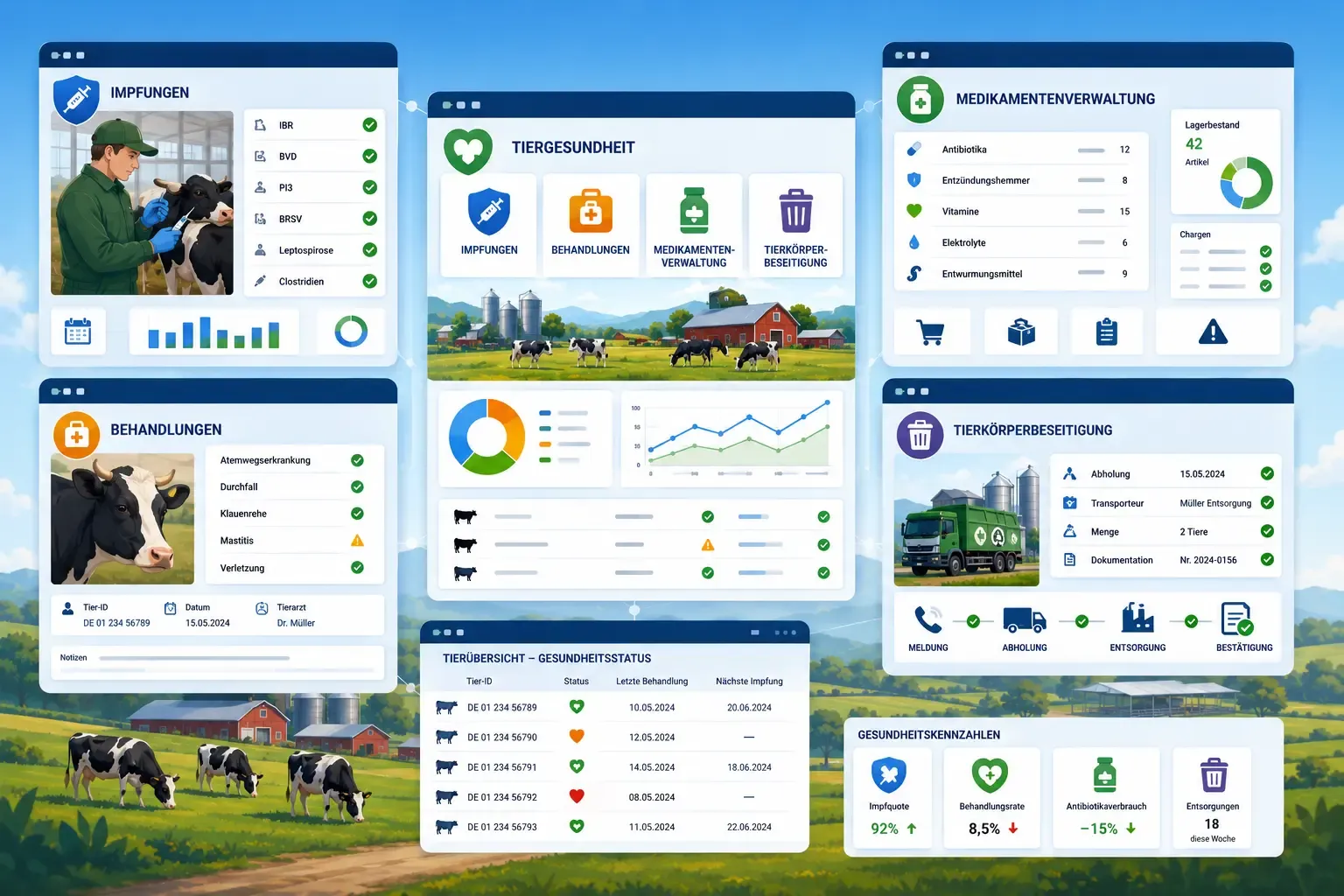
App windows over a farmyard scene: a vet vaccinating a cow beside a vaccination checklist, a treatment list, a medication inventory panel, a disposal truck, and an animal overview table with health status and KPI tiles.
Core features

Key features of animal health

The details of each function are further down, in its group.

Livestock Medicine Register (Bestandsbuch)

You generate the livestock medicine register as a PDF for any period, with every treatment with a recorded medication and every vaccination listed chronologically.

Functions by group

Treatments and withdrawal periods

Besides single animals, you record treatments for herds, poultry flocks and bee colonies, and for several animals in one step.

See all functions

Treatments

You record treatments with medication, dosage, diagnosis and duration, and FarmManager calculates separately for meat and milk when the withdrawal period ends.

More

Record veterinary treatments with medication, dosage, diagnosis, and duration. You select the batch from stock from the Business (Pro) plan if needed, and FarmManager calculates separately for meat and milk when the withdrawal period ends. For antibiotics, the active substance, AuA receipt number and treatment days are added. They form the basis of the TAMG evaluation. A new treatment sets the animal to the status “In treatment”; if its last treatment is deleted, it goes back to “Healthy”. FarmManager reminds you on the last day of treatment and on the day the withdrawal period for meat ends. If the chosen batch has expired or its stock is not enough, FarmManager points this out when you save. If a default veterinarian is stored, you also create treatments and vaccinations via “Quick treat” and “Quick vaccinate”, in the quick-actions menu or after scanning the ear tag.

Partly from the Business (Pro) plan

Treat and Vaccinate as a Group

A group becomes a single row with the number of animals treated or vaccinated, just as it appears in the livestock medicine register.

More

You record treatments and vaccinations for a single animal, a herd, a poultry flock or, where the barn module is included in the Business (Pro) plan, a barn compartment. A group becomes a single row with the number of animals treated or vaccinated, just as it also appears in the livestock medicine register. FarmManager takes the head count from the group, and you adjust it if only part was treated; the batch is deducted once per row. The milk withholding applies to every cow that belonged to the herd or the barn compartment on the day of treatment. For a poultry flock you additionally record a withdrawal period for eggs. The flock then shows until when its eggs cannot be marketed, and the egg entries from that time are marked accordingly. Groups appear with their head count in lists, filters, exports, in the calendar, in the overview of active withdrawal periods and in the search.

Partly from the Business (Pro) plan

Batch Entry from the Animal and Herd List

In the animal list you mark several animals, and each gets its own treatment or vaccination with its own withdrawal period.

More

In the animal list you select several animals and record all of them in one dialog with “Record treatment” or “Record vaccination”. Each animal gets its own treatment or vaccination with its own withdrawal period. In the herd list, each selected herd gets a group treatment or group vaccination with its current stock as the number of animals, or, for a herd linked to a poultry flock, the flock's number of animals. You give quantities per animal, and FarmManager scales them up per herd, from the Business (Pro) plan also for the deduction from the batch. A notice appears once for the whole entry if the batch is not enough or has expired. FarmManager skips animals that have left and herds without animals. The “Batch entry” filter in the treatment and vaccination lists shows all entries of one run. From the Farm (Basic) plan.

Partly from the Business (Pro) plan

Group Treatments in the TAM Report

For a group treatment, FarmManager pre-fills the use category for the TAM report from the group, and for mixed groups you choose it yourself.

More

For the TAM report, an antibiotic treatment needs a use category. For a group treatment, FarmManager pre-fills it from the group, for example from the poultry type, from the use of the barn compartment or from the herd's animal species. For mixed groups, such as cows with their calves, the field stays empty and you choose the use category yourself. In the TAM report the group counts with its number of animals. From the Business (Pro) plan, FarmManager reports it in the notification under § 56 TAMG to HI-Tier as one use with the number of animals treated.

Partly from the Business (Pro) plan

Doubled Withdrawal Period and Treatment Limit on Organic Farms

If your farm is marked as an organic farm, FarmManager doubles the withdrawal periods after treatments, except for phytotherapy and homeopathy.

More

If your farm is marked as an organic farm in FarmManager, the rules of Regulation (EU) 2018/848 apply to treatments. When you save, FarmManager doubles the withdrawal periods for meat, milk and eggs, to at least 48 hours, and keeps the statutory withdrawal period alongside. The milk block, the egg block, the check of a slaughter delivery and the standard declaration on the food chain then calculate with the organic withdrawal period. Vaccinations as well as phytotherapy and homeopathy keep the statutory withdrawal period. When you record a treatment, FarmManager points out if an animal or group receives more than three treatments in twelve months, or more than one where the life cycle is under a year, as in pig or broiler fattening. Vaccinations, parasite treatments, compulsory measures for disease eradication as well as phytotherapy and homeopathy do not count here. For the organic control body, you generate the PDF “Organic livestock inspection” in the export menu of the treatments, with every treatment and the treatment counter per animal and group. If you switch the farm to organic or back, FarmManager recalculates the withdrawal periods of the treatments of the last twelve months. From the Farm (Basic) plan.

Treating bee colonies and apiaries

A treatment also applies to a single bee colony or a whole apiary, for example against varroa.

More

A treatment also applies to a single bee colony or a whole apiary, for example against varroa. “Treat” in the colony list and “Treat apiary” in the list of apiaries open the treatment form already filled in, for an apiary with the number of its living colonies. It is saved only when you confirm that the honey supers were removed. The withdrawal period is called “Withdrawal period honey” for bees. In the livestock medicine register, the line shows the colony or apiary and location, the number of colonies and the note that the honey supers were removed. From the Farm (Basic) plan.

Photos and Voice Notes on the Entry

You attach photos, voice recordings, documents and videos to treatments, animal welfare checks and animal events.

More

To treatments, animal welfare checks and animal events you attach photos, voice recordings, documents and videos, for example the photo of the wound before the treatment or a short voice note from the barn. This works when creating and editing, in “Quick treat” and in the quick animal welfare check, so also right after scanning the ear tag; on the smartphone the file picker opens the camera straight away. In the view of the entry, photos appear as a gallery, voice recordings and videos with their own player. Recordings are stored unchanged, neither converted nor transcribed. Whoever may see the entry may open the files; whoever may edit it may add and remove them; they are stored separately by farm and are deleted permanently together with the entry. An animal event for several animals or a whole herd takes no attachments, because it produces a separate event per animal. From the Farm (Basic) plan.

Vaccinations

You record every vaccination with its withdrawal periods for meat and milk, and from the Business (Pro) plan FarmManager calculates the next vaccination dates and reminds you.

See all functions

Vaccinations

You keep a complete vaccination history per animal with vaccine, batch number, manufacturer and veterinarian.

More

Maintain a complete vaccination history per animal with vaccine, batch number, manufacturer, and veterinarian. FarmManager calculates the withdrawal periods for meat and milk from the vaccination date and the withdrawal time in days. From the Business (Pro) plan you enter the booster interval, and FarmManager works out the date of the next vaccination from it if you do not enter it yourself. Upcoming vaccinations then appear in the overviews, and FarmManager reminds you four days beforehand and on the due date.

Partly from the Business (Pro) plan

Vaccination Schedules with Calculated Due Dates

With vaccination schedules you define which animals get which vaccination when, and FarmManager calculates the dates itself.

More

Under “Vaccination schedules” on the vaccinations page you define which animals get which vaccination when, and FarmManager calculates the dates itself. A schedule applies to the individual animals of a species, if you wish only those of one herd, to a whole herd as a group vaccination, or to the farm's poultry flocks. The steps count in days from birth, from the expected calving date of the open service, from housing-in or from a reference date; with negative days you plan, for example, the dam vaccination before calving. A step counts as done as soon as a matching vaccination is recorded, and a repeated step keeps counting from the last vaccination. The “Vaccination schedule due” list above the vaccination list shows overdue and soon-due steps, and “Vaccinate” opens the form with animal or group and vaccine already filled in. The due dates also appear in the calendar and in the daily reminder. From the Business (Pro) plan.

From the Business (Pro) plan

Vaccination-schedule & treatment templates

You save vaccination protocols and veterinary treatment schedules as reusable templates.

More

Save vaccination protocols with target disease, vaccine, dose, route of administration and booster interval, and veterinary treatment schedules, as reusable templates, so vaccinations are documented to protocol. The template takes over the booster interval from the Business (Pro) plan, and FarmManager works out the date of the next vaccination from it as long as you do not enter one. Compliance-relevant fields such as withdrawal periods, animal, date and TAM report counters are deliberately excluded.

Partly from the Business (Pro) plan

Medicines and records

You note which product from which batch an animal received, from the vet's AuA receipt to the livestock medicine register.

See all functions

Medication Management

From the Business (Pro) plan, you keep a central medication catalog with batches, active ingredients and stock levels.

More

Maintain a central medication catalog with batches, active ingredients, and stock levels. If a medication falls below its minimum stock, FarmManager warns you and offers to create a task; expired and soon-to-expire batches and the stock value appear in the overview. In the treatment, the batch with the earliest expiry date is listed first, the quantity used is deducted from it, and the medication's stored withdrawal period is adopted. You can adopt a medicinal product from the bundled catalog if you wish; unverified entries are flagged there. For an approval number adopted this way you confirm “Checked against the pack” after comparing it with the pack; a number you type in yourself counts as checked by you.

From the Business (Pro) plan

Withdrawal Periods from the EU Veterinary Medicines Register

If the EU register names a withdrawal period for the product and the species, FarmManager enters it in the treatment.

More

FarmManager adopts entries from the EU Union Product Database for veterinary medicinal products of the European Medicines Agency into the bundled medicinal product catalog, from the portal’s export or from a CSV file. From the Business (Pro) plan, the medication shows this data unchanged, including marketing authorisation holder, target species, ATCvet code, legal status of supply and, where available, the withdrawal periods per species and food, plus the source with retrieval date and a note that the SPC (summary of product characteristics) remains authoritative. A product that the register lists as no longer authorised is flagged as such in the medication list. In the treatment you look the product up in the register and choose the species. If the register gives a withdrawal period for it, FarmManager enters it; otherwise you enter it from the package leaflet. For use outside the authorisation, that is a product not authorised for this species, FarmManager suggests the minimum withdrawal period under Art. 115 of Regulation (EU) 2019/6 and marks it as its own calculation; the final withdrawal period is set by the vet. Anyone who enters a shorter withdrawal period has to give a reason. Withdrawal periods that the register does not give in days or hours, such as degree-days for fish, FarmManager does not convert. The field then stays empty, and the vet sets the withdrawal period from the SPC. The withdrawal periods in the treatment are available from the Farm (Basic) plan.

Partly from the Business (Pro) plan

Recording Vet AuA Receipts

You file the AuA receipt from your vet as a photo or PDF and turn each line item into an entry in the livestock medicine register.

More

You file the application and dispensing receipt (AuA receipt) from your vet as a photo or PDF and enter the receipt number, issue date and vet. For each line item you record whether the vet applied or handed over the product, plus product, batch, quantity, dosage, diagnosis, treatment duration and the withdrawal periods for meat, milk and eggs. What is treated can be an individual animal or, as with any treatment, a herd, a barn compartment or a poultry flock with the number of animals treated. “Create treatments” turns every line that has no treatment yet into an entry in the livestock medicine register. It starts on the receipt date and carries the receipt number as AuA receipt number and proof of acquisition; the treatment works out the end of the withdrawal periods itself. From the Farm (Basic) plan.

Checking and Keeping AuA Receipts

If the receipt is a PDF with a text layer, FarmManager searches it for the receipt number and every batch entered.

More

If the receipt is a PDF with a text layer, for example from the practice software, FarmManager searches it for the receipt number and every batch entered and shows whether everything was found or what is missing. That is how a transposed digit in a batch number stands out. You compare a photo or a scanned sheet yourself, and a filter shows the receipts where that is still pending. From the Business (Pro) plan you book products the vet handed over as a batch into the farm pharmacy; the treatment created from the receipt deducts its quantity again. An AuA receipt can be deleted only five years after its issue date, which is how long the German ordinance on veterinary medicine records of livestock keepers (THAMNV) requires them to be kept.

Partly from the Business (Pro) plan

Livestock Medicine Register (Bestandsbuch)

You generate the livestock medicine register as a PDF for any period, with every treatment with a recorded medication and every vaccination listed chronologically.

More

Generate the livestock medicine register (Bestandsbuch) as a PDF for any period: every treatment with a recorded medication and every vaccination listed chronologically with animal, product, batch, quantity, diagnosis or target disease, withdrawal end, treating vet, supplier and proof of acquisition, for treatments plus the AuA receipt number and, if entered, the person who applied the product; the holding number is in the header. Batch or lot number capture is mandatory on antibiotic treatments, so the entries are complete.

Veterinarian Directory

A central directory holds your vets with practice, HI-Tier holding number (BNR) and notes.

More

Maintain a central directory of your veterinarians with practice, HI-Tier holding number (BNR) and notes. Pick a vet directly on treatments and vaccinations, or fall back to a free-text name when needed. Each entry can optionally be linked to a software user with the veterinarian role. For the antibiotic report under § 56 TAMG in the name of the vet, from the Business (Pro) plan, you also store their HI-Tier PIN; it is stored encrypted. The “Statistics” tab shows how treatments and antibiotic treatments are distributed across the vets.

Partly from the Business (Pro) plan

Mandatory examinations and hoof care

FarmManager shows which animals are due for a mandatory examination, and you record the lab results of the BVD sample and the findings of the hoof trimmer.

See all functions

Mandatory Examinations & Due Dates

For each affected animal, FarmManager derives the next due date and reminds you before the deadline expires and when it is overdue.

More

Set up recurring examination and record-keeping duties per animal species and minimum age. FarmManager derives the next due date for every affected animal from that and reminds you before the deadline expires and when it is overdue. Events already recorded count as fulfilment instead of demanding a second record. With “Apply templates” you create the statutory templates, as far as the animal species is in your farm profile: BHV1 for cattle from 24 months every 12 months, brucellosis and leukosis in cattle every 36 months, brucellosis in sheep and goats from 12 months only on official order, plus the BVD ear-notch sample for calves, the veterinary herd care in pig herds and the salmonella self-check of laying hens. The values are a starting point; what counts is what the veterinary office specifies for your farm. You also enter a fixed official date on the rule. The required depth of proof and a pointer to the responsible authority sit on the duty itself. For each rule the list shows the animals that are due and overdue; you enter a bulk-milk sample as a herd examination instead of creating an event per animal, and you record the sampling of several animals from the animal list in one step. Plus an evaluation, the export and a filter in the animal list.

BVD Ear-Notch Sample with Lab Result and BVD Status

The BVD ear-notch sample is a one-off mandatory examination, and every calf born on the farm is monitored until the end of its first month.

More

The BVD ear-notch sample is a one-off mandatory examination: every calf born on the farm is monitored until the end of its first month of life; purchased and imported animals are not due, because the examination is the birth farm's responsibility. On the sampling event you record the lab result (pending, negative, positive, doubtful or not usable), lab and sample number, for several calves in one step too; a doubtful or unusable sample fulfils no obligation. The animal list shows the BVD status per bovine: open, result pending, unsuspicious, positive with follow-up examination within 40 days or persistently infected (PI animal), and filters by “BVD open”. A positive result immediately notifies everyone who may view the mandatory examinations. With HI-Tier access, FarmManager retrieves the farm's BVD findings and the BVD status that HI-Tier holds for your cattle, read-only, every morning with automatic sync; if your access may not read the findings, FarmManager skips them and says so. From the Farm (Basic) plan.

Hoof care with findings from the ICAR Claw Health Atlas

At the claw stand you enter, animal by animal, what the hoof trimmer found.

More

Under Animal health › Hoof trimming you create each visit of the hoof trimmer with date, trimmer, herd and costs. At the claw stand you then enter, animal by animal, what the trimmer found. You scan the ear tag or choose the animal, rate the lameness from 1 to 5 and tap leg, claw and zone on a drawing of the sole. For the finding you choose the code from the ICAR Claw Health Atlas, plus severity and measure. If a medicine is used, you link the finding to the entry in the livestock medicine register (Bestandsbuch) or create the treatment straight away with the full treatment form, so that the withdrawal periods come from there. Every animal that was trimmed gets a hoof trimming event in its history, its cycle for the next hoof care continues, and a day for the follow-up check becomes a task. The costs of the visit are shown for information only; FarmManager does not book an expense from them. You export visits and findings as CSV, Excel or PDF. From the Farm (Basic) plan; from the Business (Pro) plan, key figures for the last twelve months show how many animals had a finding or were lame, which animals stand out repeatedly and which findings are most common.

Partly from the Business (Pro) plan

Fallen stock and evaluations

You follow fallen stock until collection, and the evaluations and the home page show the running treatments and withdrawal periods.

See all functions

Fallen Stock Disposal

FarmManager creates the entry for fallen stock disposal automatically as soon as you record an animal's death.

More

When you record an animal's death, FarmManager creates the entry for fallen stock disposal automatically; if you create the entry first, the animal is kept as deceased. Animals without individual identification, such as piglets or poultry, you record as a collective entry with species and number. The status runs from Open through Reported to Collected, with rendering plant (TBA), transporter, accompanying-document or VBS number and cause of death added. If a fallen animal has not been collected two days after death, FarmManager reminds you, and the dashboard shows the overdue reports. With “Order collection” you send the collection order by email to your rendering plant, with VVVO and customer number, species, number, weight, ear tag, material category and collection point, or note an order placed via portal or telephone; time, channel and recipient of the notification are stored, and the entry is set to “Reported”. You enter the details of your plant once in the settings. FarmManager derives material category 1 or 2 from species and age according to the EU rules on animal by-products, a value you choose takes precedence, and for cattle over 48 months a notice reminds you of the BSE sample. You create the commercial document as a PDF in three copies for recipient, farm and transporter; FarmManager keeps it for two years from the collection. From the Business (Pro) plan, which includes finances, you book the rendering plant's invoice straight away as an expense. Evaluations show the fallen stock by status, by cause of death and over time, plus a forecast of the number of animals per month.

Partly from the Business (Pro) plan

Animal Health Analytics

For treatments, the statistics show the most frequent diagnoses, and for vaccinations the vaccination coverage of the active animals.

More

On the “Statistics” tab, the treatments show the current withdrawal periods for meat and milk per animal, the most frequent diagnoses, the most used medications, the withdrawal period per medication and the distribution across the vets; the vaccinations show the vaccination coverage of the active animals and the distribution by species and vaccine manufacturer. The “Forecast” tab projects treatments forward and shows in which months they accumulate. The vaccination forecast and the upcoming vaccinations of the next 13 weeks are available from the Business (Pro) plan.

Partly from the Business (Pro) plan

Livestock Farming on the Home Page

The Livestock home page shows the number of animals in stock with the change over 30 days, the running withdrawal periods and the overdue tasks.

More

The Livestock home page shows the number of animals in stock with the change over 30 days, the running withdrawal periods, the overdue tasks and, from the Business (Pro) plan, the births and the vaccinations due in the next 14 days. Rings at the bottom show the animal stock by species and by sex. “To do” lists withdrawal periods about to end and, from the Business (Pro) plan, also upcoming vaccinations, expected births and medicine batches about to expire. In the farm overview, the Animal health and Animal welfare areas summarize the remaining figures. Animal health shows vaccinations and treatments, ongoing treatments, active withdrawal periods and overdue fallen-stock reports, and from the Business (Pro) plan also the upcoming vaccinations, medications with low stock and batches about to expire. Animal welfare shows welfare checks requiring action and, with the TAM module switched on, the days until the next reporting deadline with the open reports as well as the therapy frequency. From the Business (Pro) plan, barns above the permitted stocking density and ASF assessments with high risk are added. What a user may not see or their plan does not include does not appear there.

Partly from the Business (Pro) plan
Common questions

Frequently asked questions

Answers to common questions about this module.

Modules

Other modules

These modules belong to the same area and work with the same data.

Animals & Barn

Try it with your own animals and fields

You test FarmManager free for 30 days, and on request we do the setup together with you at no extra charge.