Modules

Personnel Planning

Plan shifts, employment contracts, vacations and working hours in one place. The shift generator automatically takes contracts, absences, rest times and weekly ceilings under the ArbZG as well as Sundays and public holidays into account — with fair distribution across all staff.

12capabilities
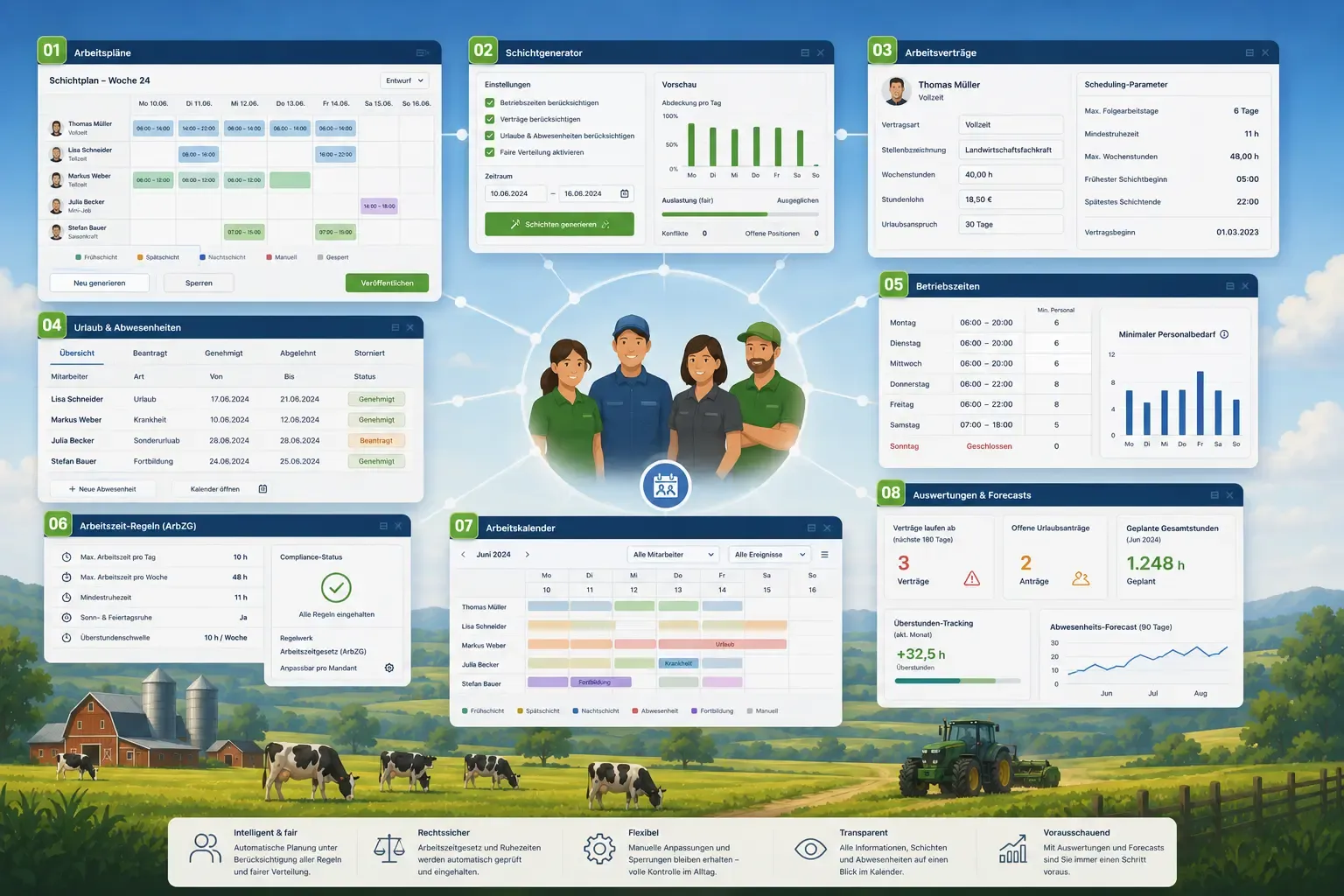
Numbered app windows around four employees standing together: a shift schedule table, a shift generator with a bar chart, an employment contract, a leave list, and a work calendar with coloured shift blocks, with a pasture and cows in the background.
capabilities

Personnel Planning: 12 capabilities

01

Work Plans & Shift Generator

Build period-based shift schedules with a Draft → Published → Archived status workflow. Automatic shift generation respects operating hours, active employment contracts, requested and approved absences and nationwide statutory public holidays, and distributes shifts evenly across the team. What cannot be staffed is listed in a report with the reason – no suitable role, rest time, weekly ceiling or nobody available. Every plan can be edited, locked or regenerated manually; manual and locked entries are preserved, all others are generated anew. Shifts can be swapped, and a sick report made from the shift enters the sick day as well.
02

Employment Contracts

Capture per employee the contract type (full-time, part-time, mini-job, seasonal, trainee, freelancer), job title, weekly hours, hourly wage or monthly salary and per-person scheduling parameters such as max consecutive workdays or minimum rest time. If the wage at the start of the contract is below the statutory minimum wage, FarmManager rejects the contract (trainees and freelance work excepted); for seasonal workers FarmManager also counts the workdays against the 70-day limit, with a projection.

03

Vacations & Leave

Manage vacation, sick leave, unpaid leave, special leave, parental leave and training with an approval workflow (Requested → Approved/Rejected → Cancelled), including half days at the start or end. Weekends and nationwide statutory public holidays do not count as vacation days. Management or HR keep a leave account per employee and year with annual leave, carry-over and adjustment; every vacation request shows entitlement, days taken, requested and remaining. Requested and approved days block shift scheduling and appear in the calendar.

04

Operating Hours

Define opening and closing times per weekday and the staffing requirement – as a minimum staffing or, more precisely, as a role requirement, for example two milkers with a three-hour shift each. The generator staffs a role only with employees whose contract carries the same job title; closed days stay free.

05

Work Time Rules (ArbZG)

Pre-configured values based on the German Working Time Act — max daily and weekly hours, breaks after six and nine hours, minimum rest, Sunday and holiday work and overtime thresholds, adjustable per farm, for example to a collective agreement. Public holidays are the nationwide statutory ones. The shift generator takes rest time, weekly ceiling and Sundays and public holidays into account; FarmManager checks breaks and daily maximum hours against the recorded working time.

06

Work Calendar

A clear calendar view of all shifts and leave events, colour-coded by employee and event type and filterable by employee. You move shifts by drag & drop; a moved shift counts as manual and is preserved when you regenerate. Management, farm managers and HR see the work calendar; employees see their planned shift of the day on the time clock.

07

Analytics & Forecasts

Widgets for contract expiry alerts (30/90/180 days), pending leave requests, scheduled total hours, overtime tracking and a 90-day absence forecast. A staffing-demand forecast estimates the demand for the next 28 days from operating hours and minimum staffing, compares it with the contracted target hours minus absences and shows what percentage of it planned shifts already cover – also on the dashboard.

08

Time Clock with Breaks and Net Working Time

Employees clock themselves in and out without admin rights – on the time clock or from the header bar: start work, start break, end break, end work. The time clock shows the planned shift with its expected end and points out the break that is due after six and nine hours; on clock-out the actual hours are calculated as end minus start minus all breaks. Management, farm managers and HR also see there who is currently clocked in – with start, booking target and status (working, break, overdue). Access requires one's own active employment contract at the farm, for management too.

09

Hours Record per § 17 MiLoG

Generate a print-ready hours record (A4) per employee and month, from the browser or as a PDF with a confirmation sentence and signature lines for employee and employer. It lists start, end, break and actual hours for every workday with a monthly total, compares target and actual, gives notes on the Working Time Act, checks the effective wage against the statutory minimum wage and carries the notice text under § 17 MiLoG. Employees print their own record; management, farm managers and HR print the records of everyone.

10

Book time onto a barn, field or job

When clocking in you pick where the time belongs from a quick-select tree — barn, field, contract job or your own cost centre; the target booked last is pre-filled, and the entry is optional. When the work changes during the day you split the shift instead of overwriting the earlier booking. Drivers are offered only the jobs they may book onto; the job in turn shows which hours ran against it.

11

A work day, not a calendar day

A shift across midnight counts towards the work day it began on — the hours do not slide into the next day, and events after midnight are marked. If someone forgets to clock out, FarmManager recognises the open entry as such, tells the person themselves and not only HR, lets them correct it, and HR can close the case instead of chasing it forever.

12

A printable day sheet

On the time clock, employees print their current work day as an A4 sheet with presence, break, net working time, the course of the day including booking targets and target/actual/variance. The working-time notes are filtered to that exact day. A day still running prints as a provisional figure with the time it was taken; for other people and whole months there is the hours record.

Common questions

Frequently asked questions

Quick answers to the questions farms ask most often about this module.

Modules

Other modules

Explore more modules from this area — each one is built to work seamlessly with the others.

Calendar & Tasks

Payroll & Social Insurance

Quality, Safety & Traceability

Built for real farms and modern operations

Scale from small farms to large enterprises.