Modules

Storage & Warehouse

A warehouse for your farm inputs and your harvest – storage locations, dated and expiring batches with FIFO valuation and a movement journal; purchases and sales end up as expense and income in your finances. From the fuel tank to the grain silo, you see what is in stock, what it is worth and where it came from.

19capabilities
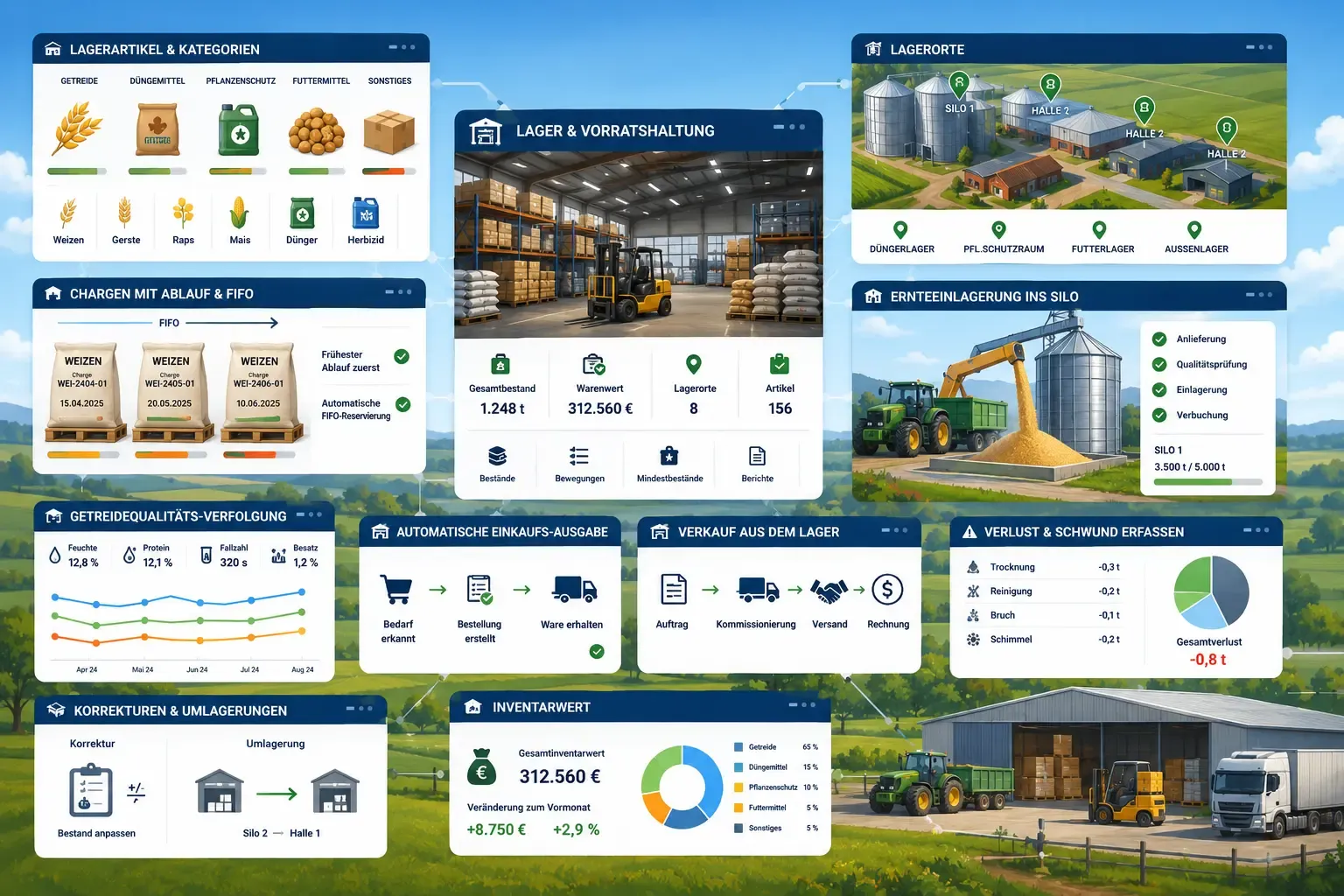
App windows over a farm with a storage warehouse: storage categories with grain and fertilizer icons, a forklift inside the warehouse, an aerial map with location pins for silos, batch cards with expiry dates under FIFO, and grain being loaded into a silo.
capabilities

Storage & Warehouse: 19 capabilities

01

Storage Items & Categories

Maintain a central catalog of everything you keep on stock – fuel, lubricants, seed, fertilizer, plant protection, feed, bedding, manure and harvested crops. Each item carries its own unit (litre, kg, decitonne, tonne, m³ or piece), a minimum-stock level, optionally a default storage location and, for harvested produce, a crop-type link.

02

Item Barcodes & Scan Booking

Store the GS1 item numbers (EAN/GTIN) on storage items, spare parts, plant protection products and your own fertilizers. FarmManager checks the check digit and, for a number assigned twice, names the item that already carries it; several codes per item, for a sack and a pallet for example, are possible. With “Scan item” the camera reads a code. For a storage item you then book a receipt or withdrawal right away; for the receipt, the last used or the item's default storage location is pre-filled. For a spare part, plant protection product or fertilizer, the scan opens the record.

03

Storage Locations with Fill Level & 3D Occupancy

Map every place you store goods – silo, bunker silo, flat store, tank, cold store, warehouse or outdoor. Set a capacity per location and FarmManager shows the live fill level from the remaining quantity of all batches inside. Reserve a location for a single dedicated item or leave it open for mixed use. In the 3D occupancy view, every storage location appears spatially with its batches as segments – the fill level is stock divided by capacity, exactly as in the storage-location table; the batch to be withdrawn next by FIFO (oldest received date first) is highlighted in the scene, and batches without a location land in their own compartment. For one or more storage locations you print QR labels (eight per A4 sheet) with name, type, capacity and reserved item; a scan opens the storage location in FarmManager, provided you are signed in and have the right to edit.

04

Batches with Expiry & FIFO

Every delivery becomes a dated batch with received date, quantity, purchase unit price, supplier and optional expiry date. Stock is always drawn oldest-batch-first (FIFO) so goods rotate correctly, and the true inventory value is computed from the remaining quantity of each batch at its own purchase price.

05

Movement Journal

Purchases, intakes, consumption, corrections, transfers, sales, losses and blends appear as a row in the journal – with date, type, quantity, value, batch, article and user, per item and per location. The rows cannot be edited by hand; you book a stock shortfall as a correction. If you change or delete the operation a row is based on (a sale or a material use, for example), FarmManager adjusts the row or removes it. Changes to items, storage locations, batches, sales and losses are in your farm's activity log.

06

Harvest Intake into Silo

Store your harvest straight from the crop plan or from a field activity with a recorded harvest quantity – such as mowing, baling, chopping or threshing, even without a crop plan – into one or more silos. FarmManager suggests matching storage items from the crop type and the quantity from the recorded yield and lets you split the load across several silos – creating the batches and journal entries in a single step.

07

Grain Quality Tracking

Record a per-batch quality timeline as grain is re-tested over its storage life – moisture, protein, hectolitre weight, falling number, oil content, foreign matter and an overall grade, with lab and sample reference. The latest reading is carried onto the batch so quality is filterable and sortable at a glance.

08

Automatic Purchase Expense

Recording a stock purchase with a purchase price books the matching expense in the Finance module automatically and keeps it in sync with the delivery – change or delete the delivery and the expense follows. Delivery, supplier and cost live in one place, and you never type the same cost in twice.

09

FIFO Consumption from Machines, Fields & Feeding

When logging operating hours, choose the on-farm tank or store as the fuel source and the quantity is deducted FIFO from stock – with no second expense, because the fuel was already booked on delivery. Field-register material use (seed, fertilizer, plant protection) draws from the store the same way, keeping book stock and field records in lockstep; a feeding deducts its quantity in the same way when you choose a storage item as the source there – with no second expense. Every withdrawal – fuelling, material use, feeding or a manual booking – runs through the same central FIFO logic, so remaining quantities and the booking journal stay consistent.

10

Sell from Store

Sell a specific batch or draw the item FIFO across its batches in one action. Enter quantity, sale price and date and choose the buyer from your customer register or enter a name – the stock is written down and the revenue is booked as Income in the Finance module automatically. A sale can be booked against an open delivery contract for harvested crops, whose fulfilment is updated as a result. You enter gross and tare weight from the scale right away; you print the delivery note and weighing note directly on the sale. An over-sell is blocked against the available stock.

11

Grain Settlement

Settle a grain, rapeseed or grain-maize delivery on the sale. From gross and tare, which were recorded at the sale, and the measured values of the delivery – moisture, protein, hectolitre weight, falling number, foreign matter – FarmManager works out, using a deduction scale, the moisture shrinkage to the base moisture, quality surcharges and deductions, drying costs and the settled weight. An amount in euros is available when the sale is linked to a fixed-price delivery contract in a mass unit. The settlement appears as a credit-note view on the sale and does not change the income booked. The preset scales for grain, rapeseed and grain maize are guide values and cannot be changed in the app.

12

Record Loss & Shrinkage

Write down spoiled, shrunk, contaminated, mouldy, pest-damaged, stolen or disposed-of stock with a clear reason and date. A loss reduces the goods value cleanly without touching Finance – so it is never mistaken for a sale or an expense – and the write-down lands in the journal for full traceability.

13

Blend Batches (Verschneiden)

Combine two or more batches of the same item into one new batch in a silo – to consolidate lots or lift a sub-spec grade by mixing in a better one. The cost basis and the numeric quality values are recomputed as quantity-weighted averages, so inventory value is conserved and no money is re-booked.

14

Corrections & Transfers

Run a stocktake correction to align book stock with a physical count, or relocate a batch to another location – each captured as its own journal entry. Manual intakes let you book in stock that didn't come from a purchase, such as your own harvest, without creating a finance record.

15

Inventory Value, Statistics & Forecast

See the true value of everything in stock at any time – computed FIFO from the remaining quantity of each batch at its own purchase price. Analytics tabs break it down by category, showing where your capital is tied up across fuel, seed, fertilizer, feed and harvest, plot purchase value versus consumption value per month and project future consumption value with a trend line and R² confidence. Per location you get fill levels and a movement journal, so you can plan purchases and rotation on data.

16

Low-Stock & Expiring-Batch Reminders

Batches carry an expiry date. Items below their minimum stock and batches that are about to expire are flagged in the list, can be filtered out specifically there and trigger a reminder – by notification and email, bundled by default. If an item drops below its minimum stock through a withdrawal, FarmManager reports that at once and, on request, creates a task to reorder with one click. So you have a clear shortlist of what to reorder and what to use up first – before you run dry or let stock spoil.

17

Hay Temperature Monitoring — Hay Stacks Under Watch

Record every stored lot as a hay stack — with the material (hay, straw or haylage), the estimated quantity, a building from your master data or a free-text location for outdoor storage and a responsible person. From the storage date FarmManager works out the two-month monitoring window itself; it is read-only and cannot be shortened by hand. You do not have to keep the rhythm in your head afterwards — FarmManager reports every hay stack whose measurement has fallen due, in the app and by email, with its last measurement, rating and window end. The rhythm hangs on the last measurement of that particular hay stack, not on a farm-wide weekday.

18

The Measurement Series with a Rating as a Record Book

An open hay stack carries the "Measurements" tab — one row each with the time, the core temperature measured, the probe depth, the person measuring and a remark. Time and person are pre-filled, a date in the future is refused, values outside −20 to 120 °C are turned down as typos, and deleted measurements stay traceable as a deleted entry. As soon as the temperature is entered, the form shows the classification — below 45 °C unremarkable, from 45 °C elevated, from 60 °C critical, from 70 °C highest level, each with a concrete recommended action up to calling the fire brigade. These are guidance values from advisory practice and not statutory limits, and FarmManager triggers no alarm in doing so; the rating is fixed when you save, so later changes to the thresholds never reinterpret old measurements after the fact.

19

Export the Measurement Record

Export the record for all hay stacks or for a selected few — with name, material, status, building, storage location, storage date, monitored until, quantity, number of measurements, last measurement, peak temperature, responsible person and notes. Exactly what a fire insurer or a fire investigation wants to see.

Common questions

Frequently asked questions

Quick answers to the questions farms ask most often about this module.

Modules

Other modules

Explore more modules from this area — each one is built to work seamlessly with the others.

Contracting Business

Finances

Multi-Farm Management

Analytics & Administration

Built for real farms and modern operations

Scale from small farms to large enterprises.