Modules

Plant Protection

Document crop protection in one place – applications with a check against the authorisation when you record them, products, certificates of competence and equipment.

9capabilities
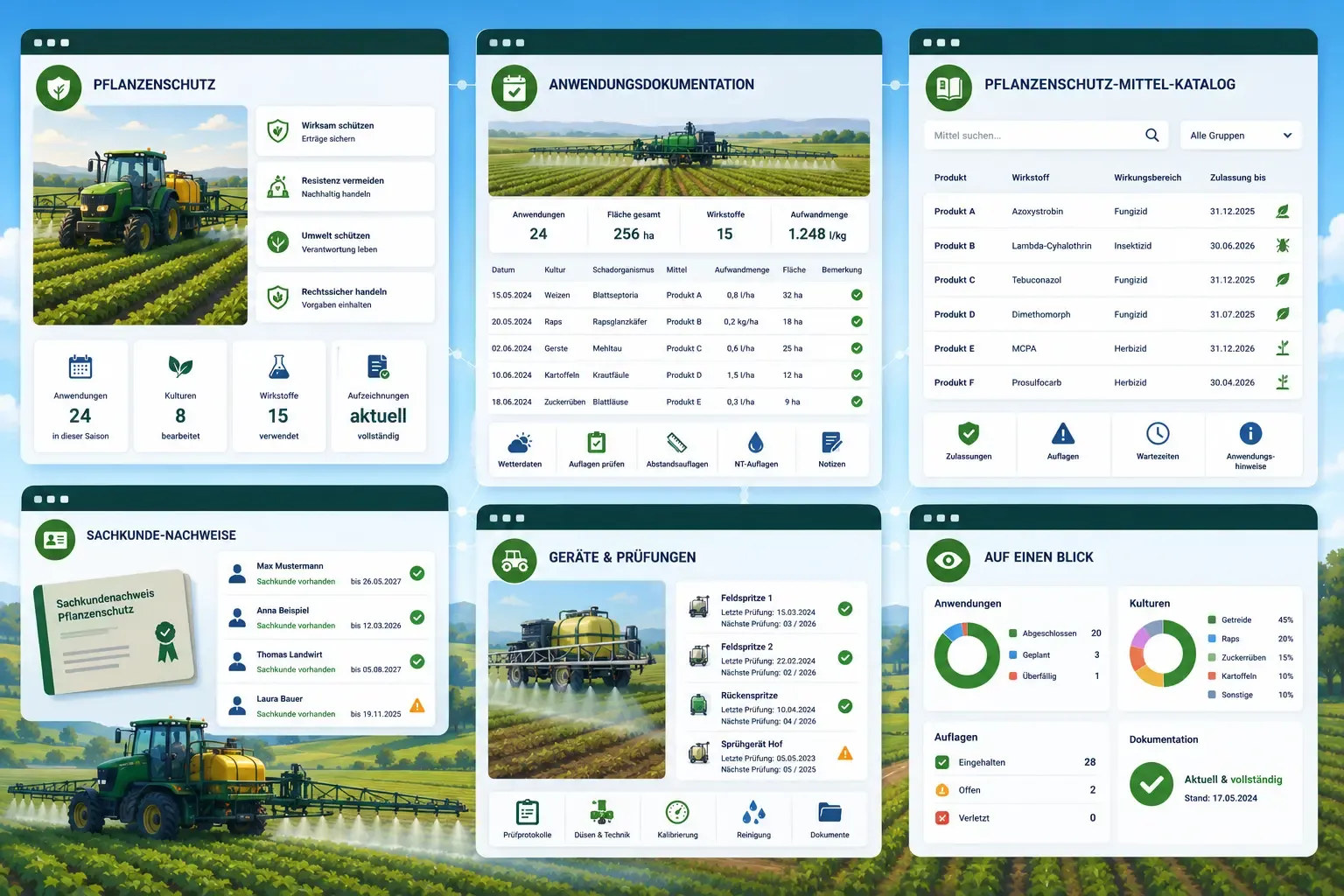
Green app windows over a field with a spraying tractor: an application log table by date and crop, a searchable pesticide-product catalogue, competence certificates with expiry dates, and a sprayer inspection checklist.
capabilities

Plant Protection: 9 capabilities

01

Application Records

Log every crop protection application with product, application rate, crop, area and applicator – as proof of good agricultural practice. The record covers the extended scope of Implementing Regulation (EU) 2023/564. That includes the start of the application where the authorisation restricts the time of day, the type of use — outdoors, greenhouse or seed treatment — with the reference quantity that goes with it, and the batch number for treated seed, for which there is no area to point at. You also record the BBCH stage, EPPO codes of crop and pest, water volume, bee-protection class B1 to B4, distances to water bodies and edge structures as well as the details on integrated pest management. From the withdrawal period and the application date, “Harvestable from” results, and a filter shows the applications with a running withdrawal period. Name, authorisation number and active substances of the product are recorded at the time of the application. A column marks each record as complete, incomplete or – if it was created more than 30 days after the application – as recorded late.
02

Check Against Authorisation and Area of Use

When you record an application, FarmManager compares it with the product's areas of use and warns if the crop does not belong to them, the pest is not named (provided its EPPO code can be placed in the directory), the application rate exceeds the authorised one, the BBCH stage lies outside the authorised window, the authorised maximum number of applications on the field in the year has already been recorded, the minimum interval between two applications is not met or the recorded distance to water is below the condition. For farms in Germany, the areas of use come from the BVL directory, which FarmManager mirrors automatically every month – for every product whose authorisation number is listed there; farms in other countries check against their own areas of use. Areas of use of your own, which you maintain on the product or read in by CSV or Excel, take precedence; for such a product, only your entries then provide the answers. FarmManager suggests the withdrawal period of the crop and raises a shorter one when you save, and if the application date is after the end of authorisation on the product, a warning also appears. Nothing is blocked, because an authorisation under § 22 Abs. 2 PflSchG can cover an application outside the authorisation. Where neither the directory nor your areas of use say anything, the check stays silent. FarmManager checks imported applications in the same way and returns the notices as a file.

03

Distance Conditions, Technique and Tank Mixing

With the drift-reduction class and the plant height that you enter on the application, FarmManager reads the distance conditions of the BVL directory as they apply to your equipment and your crop stand – for the distance to water, for indications that allow only equipment from a certain class near water, and for the distance to edge structures under the NT conditions. Without these entries, FarmManager warns only where the distance would be too short even with the best equipment and at any plant height. Whether an exception lifts an NT condition, for example portable equipment or a narrow edge structure, FarmManager cannot judge. The warning therefore names the exceptions that come into question; you tick one that applies, and it stays saved on the application as the reason. Also checked are the water volume for NT140 and NT145, the type of use, the application technique, whether an indication applies to non-professional users only, and the tank partners entered, for example when a prescribed mixing partner is missing. Like the minimum interval between two applications, these checks come solely from the directory, are therefore limited to farms in Germany, do not apply to products with areas of use of your own, and are hints, not blocks.

04

Machine-Readable Record

Export the complete record in machine-readable form as CSV under Implementing Regulation (EU) 2023/564 or as InVeKoS/Schlagkartei in XML or CSV, with the georeferenced image of the treated area including FLIK and parcel key alongside the outline. A validation step reports beforehand which mandatory field is still missing on an application — instead of it surfacing during an inspection. In addition there is an archive of the change history as JSON: it contains every change to the plant protection records, including deleted ones, hash-chained and independent of filter and selection. The chaining begins with the introduction of the archive; older changes are not chained retroactively.

05

Product Catalog

Maintain a catalog of your plant protection products with active ingredients and approval data. For farms in Germany, the authorisation number must match the official BVL format, and FarmManager reconciles it with the BVL directory – a notice shows whether the product is listed there as authorised, whether the authorisation has ended, including the grace period for use up where the directory gives one, or whether the number is missing; this check never blocks saving. Once the number is known, you take over trade name, area of effect, end of authorisation, active substances with content, the authorisation holder as manufacturer and the hazard notes from the GHS labelling with one click. Through the search in the directory you can also find a product by name, authorisation number, holder or active substance, narrowed down by type of entry, area of effect and current authorisation, and take it over in the same way. Farms in other countries enter the authorisation number of their country freely; for them the search takes over trade name, area of effect, manufacturer, active substances and hazard notes – without the German authorisation. In the product you see the directory with labelling, conditions and all areas of use. Key figures show how many authorisations end in the next 90 days or have already expired, and a chart the authorisations expiring in the coming twelve months.

06

Products Reconciled with the BVL Directory

After each new edition of the BVL directory, FarmManager reconciles the products of farms in Germany with it and reports what is new in the app and, depending on your settings, by email – for example an ended authorisation, an authorisation end that differs from your entry, or a number that the directory does not list. The product list also shows the findings as a column and a filter, and you can take over the directory's authorisation end for several products at once. If a product carries the number of a reference product but has the name of one of its parallel imports, FarmManager points this out; if exactly one import fits, you switch the number after confirming, otherwise you take it from the label. For ended products whose grace period for use up the directory names, FarmManager reminds you in good time before it ends. The reconciliation never changes your products by itself, and a number missing from the directory is a hint, not a verdict – an emergency authorisation, for example, is missing there as well.

07

Certificates of Competence

Store the certificates of competence (Sachkunde) for your applicators and keep track of expiry dates.

08

Equipment & Inspections

Manage plant protection equipment (e.g. field sprayers) including upcoming inspection due dates.

09

Plant-protection templates

Save proven spraying recipes (product, application rate, water volume, target organism) as a template. Regulated fields such as date and field are deliberately not carried over.

Common questions

Frequently asked questions

Quick answers to the questions farms ask most often about this module.

Modules

Other modules

Explore more modules from this area — each one is built to work seamlessly with the others.

Land Management

Crop Management & Crop Rotation

Fertilization Management (DüV)

Fleet & Machinery

Telematics & Live Fleet Map

Built for real farms and modern operations

Scale from small farms to large enterprises.